
On this page, you can download HyperOS 2 (OS2.0.202.0.VPRIDXM) flash file for Redmi Note 15 Pro+ 5G/POCO M8 Pro 5G (Indonesia) based on Android 15 version.

The Redmi Note 15 Pro+ 5G/POCO M8 Pro 5G (Codenamed: flourite) HyperOS OS2.0.202.0.VPRIDXM for Indonesia is available as:
- Full Fastboot ROM – Full ROM package for clean installs.
Follow the detailed tutorial on how to install HyperOS OS2.0.202.0.VPRIDXM on Redmi Note 15 Pro+ 5G/POCO M8 Pro 5G (Indonesia) from here – Fastboot ROM.
Disclaimer
Flashing is a tedious process and should be carried out carefully; otherwise, it may permanently damage your device. XiaomiAdvices.com or Xiaomi is not responsible for any damage that may be caused to your device while flashing. Proceed at your own risk.
Redmi Note 15 Pro+ 5G/POCO M8 Pro 5G HyperOS OS2.0.202.0.VPRIDXM Indonesia Stable Fastboot ROM
| FASTBOOT ROM | |
|---|---|
| File Name | flourite_id_global_images_OS2.0.202.0.VPRIDXM_20251107.0000.00_15.0_id_d3ee001680.tgz |
| Device | Redmi Note 15 Pro+ 5G/POCO M8 Pro 5G |
| Codename | flourite |
| HyperOS Version | OS2.0.202.0.VPRIDXM |
| Android | 15.0 |
| Branch | Stable |
| Region | Indonesia |
| Type | Full |
| Size | 9.1 GB |
| Date | 2025-11-07 |
| MD5 | d3ee001680a6b3b385b12b06bd1e309d |
How to Flash HyperOS OS2.0.202.0.VPRIDXM Fastboot ROM on Redmi Note 15 Pro+ 5G/POCO M8 Pro 5G (Indonesia)
- Download and extract the Redmi Note 15 Pro+ 5G/POCO M8 Pro 5G HyperOS OS2.0.202.0.VPRIDXM Fastboot ROM on your computer. Make sure to check if the ROM file suffix is “.tgz“. If it is “.gz“, please rename it to “.tgz“.
- Download and extract HyperOS ROM Flashing Tool on your computer.
- Make sure your Redmi Note 15 Pro+ 5G/POCO M8 Pro 5G’s bootloader is unlocked.
- Power off and boot Redmi Note 15 Pro+ 5G/POCO M8 Pro 5G (Indonesia) into Fastboot Mode by pressing the Volume Down and Power buttons together until you see the Fastboot logo.

- Connect your device to computer using USB Cable.
- Run XiaoMiFlash.exe and select the HyperOS OS2.0.202.0.VPRIDXM Fastboot ROM folder.
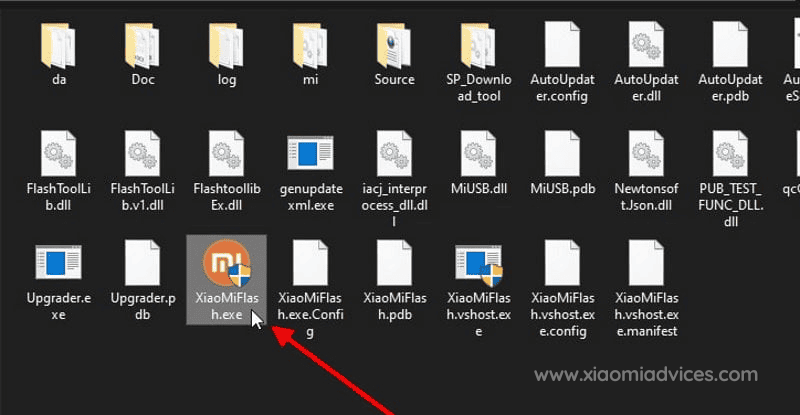
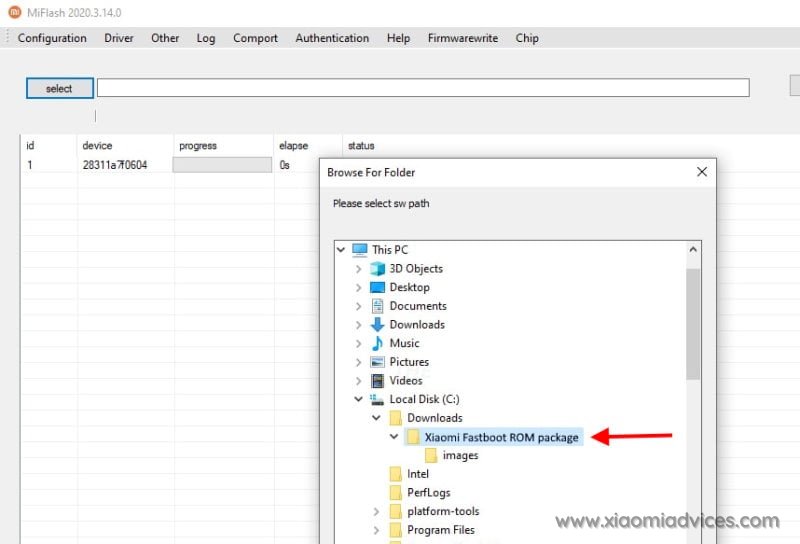
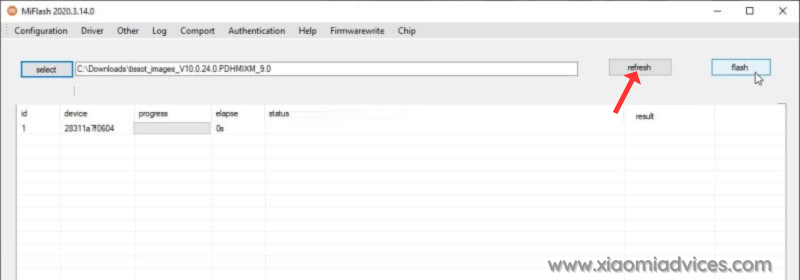
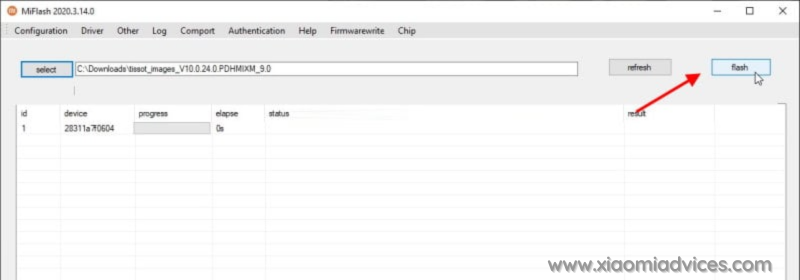
- Click on refresh to detect your device and click on flash to start the flashing process.
Follow the detailed guide on how to flash HyperOS OS2.0.202.0.VPRIDXM Fastboot ROM on Xiaomi, Redmi and POCO devices here.