• Skip to primary navigation
  • Skip to main content
  • Skip to primary sidebar

XIAOMI ADVICES

Xiaomi News Blog | MIUI ROM | Firmware Update | Custom ROM | Root | Android Apps | Lineage OS

Search icon
  • HyperOS
  • MIUI ROM
  • Mobile Phone Specs
  • Xiaomi USB Drivers
  • Root
  • How To
Trending 🔥
MIUI 15 MIUI 14 Download MIUI 14 Features Xiaomi Android 13 Magisk Zygisk POCO Launcher Xiaomi Game Turbo 5.0 Mi Account Unlock
Home HyperOS Redmi Pad 2 Pro/POCO Pad M1 OS3.0.301.0.WPWTRXM
Join Xiaomi Advices on Telegram

Download Redmi Pad 2 Pro/POCO Pad M1 Turkey HyperOS OS3.0.301.0.WPWTRXM Fastboot ROM and Recovery ROM

FacebookTwitterReddit

On this page, you can download HyperOS 3 (OS3.0.301.0.WPWTRXM) flash file for Redmi Pad 2 Pro/POCO Pad M1 (Turkey) based on Android version.

Redmi Pad 2 Pro/POCO Pad M1 HyperOS OS3.0.301.0.WPWTRXM Recovery ROM & Fastboot ROM

The Redmi Pad 2 Pro/POCO Pad M1 (Codenamed: flute) HyperOS OS3.0.301.0.WPWTRXM for Turkey is available as:

  • Full Recovery ROM – Full ROM package for installs via Recovery.
  • Incremental Update (Recovery ROM) – Incremental MIUI OS3.0.301.0.WPWTRXM OTA update.
  • Full Fastboot ROM – Full ROM package for clean installs.

Follow the detailed tutorial on how to install HyperOS OS3.0.301.0.WPWTRXM on Redmi Pad 2 Pro/POCO Pad M1 (Turkey) from here – Fastboot ROM | Recovery ROM | Incremental Update.

Disclaimer

Flashing is a tedious process and should be carried out carefully; otherwise, it may permanently damage your device. XiaomiAdvices.com or Xiaomi is not responsible for any damage that may be caused to your device while flashing. Proceed at your own risk.

Table of contents
  1. How to Flash HyperOS OS3.0.301.0.WPWTRXM Fastboot ROM on Redmi Pad 2 Pro/POCO Pad M1 (Turkey)
  2. How to Install HyperOS OS3.0.301.0.WPWTRXM Recovery ROM on Redmi Pad 2 Pro/POCO Pad M1 (flute) via Stock Recovery
  3. Install HyperOS Recovery ROM on Redmi Pad 2 Pro/POCO Pad M1 via Software Updater using PC

Redmi Pad 2 Pro/POCO Pad M1 HyperOS OS3.0.301.0.WPWTRXM Turkey Stable Recovery ROM

RECOVERY ROM
File Nameflute_tr_global-ota_full-OS3.0.301.0.WPWTRXM-user-16.0-a6caaba1d8.zip
DeviceRedmi Pad 2 Pro/POCO Pad M1
Codenameflute
HyperOS VersionOS3.0.301.0.WPWTRXM
Androidn/a
BranchStable
RegionTurkey
TypeFull
Size5.2 GB
Date2026-07-03
MD5a6caaba1d81668f033c087f5105521f1
Changelog

Redmi Pad 2 Pro/POCO Pad M1 OS3.0.301.0.WPWTRXM Stable Recovery ROM – Changelog

[Comprehensive system app optimization]
Calendar:
Optimization: Holiday display in Calendar, with more traditional festivals and historical commemorative days
Fix: An issue where dates displayed incorrectly in some cases

Other improvements:
New: The option to tap the status bar to return to the top of the page in some apps and scenarios
Optimization: Visual feedback when you adjust screen brightness with the keyboard
Optimization: Mi Mover now supports transferring more data, including some settings and user data from system apps
Optimization: Home screen grid has been redesigned with more balanced margins and more comfortable spacing
Optimization: Gallery search animations for smoother transitions
Fix: An issue where macOS compressed files didn’t display properly in File Manager in some cases
Fix: Stuttering when loading multilingual screenshot thumbnails in some cases
[Xiaomi HyperIsland]
New: View all the important info at a glance with Xiaomi HyperIsland
New: Now you can pull down to expand small windows and handle multiple tasks more efficiently
[Interconnectivity]
New: Xiaomi tablets now support AirPods, including fast pair pop-ups, battery status, Spatial Audio, noise cancellation switching, and Find My
[Privacy and security]
New: More system apps now support Private access, with ongoing compatibility improvements for additional apps
Optimization: Updated “Fingerprints, face data, and screen lock” page layout for easier, faster setup

Redmi Pad 2 Pro/POCO Pad M1 HyperOS OS3.0.301.0.WPWTRXM Turkey Stable Incremental Update Recovery ROM

INCREMENTAL UPDATE
File Nameflute_tr_global-ota_incremental-OS3.0.3.0.WPWTRXM-OS3.0.301.0.WPWTRXM-user-16.0-ca248de271.zip
DeviceRedmi Pad 2 Pro/POCO Pad M1
Codenameflute
HyperOS VersionOS3.0.301.0.WPWTRXM
Androidn/a
BranchStable
RegionTurkey
TypeIncremental
Size5.2 GB
Date2026-07-03
Changelog

Redmi Pad 2 Pro/POCO Pad M1 OS3.0.301.0.WPWTRXM Stable Incremental Update – Changelog

[Comprehensive system app optimization]
Calendar:
Optimization: Holiday display in Calendar, with more traditional festivals and historical commemorative days
Fix: An issue where dates displayed incorrectly in some cases

Other improvements:
New: The option to tap the status bar to return to the top of the page in some apps and scenarios
Optimization: Visual feedback when you adjust screen brightness with the keyboard
Optimization: Mi Mover now supports transferring more data, including some settings and user data from system apps
Optimization: Home screen grid has been redesigned with more balanced margins and more comfortable spacing
Optimization: Gallery search animations for smoother transitions
Fix: An issue where macOS compressed files didn’t display properly in File Manager in some cases
Fix: Stuttering when loading multilingual screenshot thumbnails in some cases
[Xiaomi HyperIsland]
New: View all the important info at a glance with Xiaomi HyperIsland
New: Now you can pull down to expand small windows and handle multiple tasks more efficiently
[Interconnectivity]
New: Xiaomi tablets now support AirPods, including fast pair pop-ups, battery status, Spatial Audio, noise cancellation switching, and Find My
[Privacy and security]
New: More system apps now support Private access, with ongoing compatibility improvements for additional apps
Optimization: Updated “Fingerprints, face data, and screen lock” page layout for easier, faster setup

Redmi Pad 2 Pro/POCO Pad M1 HyperOS OS3.0.301.0.WPWTRXM Turkey Stable Fastboot ROM

FASTBOOT ROM
File Nameflute_tr_global_images_OS3.0.301.0.WPWTRXM_20260624.0000.00_16.0_tr_c7941e532d.tgz
DeviceRedmi Pad 2 Pro/POCO Pad M1
Codenameflute
HyperOS VersionOS3.0.301.0.WPWTRXM
Android16.0
BranchStable
RegionTurkey
TypeFull
Size6.4 GB
Date2026-06-24
MD5c7941e532dcf7f3bfcc5f32758c0c773
Changelog

Redmi Pad 2 Pro/POCO Pad M1 OS3.0.301.0.WPWTRXM Stable Fastboot ROM – Changelog

[Comprehensive system app optimization]
Calendar:
Optimization: Holiday display in Calendar, with more traditional festivals and historical commemorative days
Fix: An issue where dates displayed incorrectly in some cases

Other improvements:
New: The option to tap the status bar to return to the top of the page in some apps and scenarios
Optimization: Visual feedback when you adjust screen brightness with the keyboard
Optimization: Mi Mover now supports transferring more data, including some settings and user data from system apps
Optimization: Home screen grid has been redesigned with more balanced margins and more comfortable spacing
Optimization: Gallery search animations for smoother transitions
Fix: An issue where macOS compressed files didn’t display properly in File Manager in some cases
Fix: Stuttering when loading multilingual screenshot thumbnails in some cases
[Xiaomi HyperIsland]
New: View all the important info at a glance with Xiaomi HyperIsland
New: Now you can pull down to expand small windows and handle multiple tasks more efficiently
[Interconnectivity]
New: Xiaomi tablets now support AirPods, including fast pair pop-ups, battery status, Spatial Audio, noise cancellation switching, and Find My
[Privacy and security]
New: More system apps now support Private access, with ongoing compatibility improvements for additional apps
Optimization: Updated “Fingerprints, face data, and screen lock” page layout for easier, faster setup

How to Flash HyperOS OS3.0.301.0.WPWTRXM Fastboot ROM on Redmi Pad 2 Pro/POCO Pad M1 (Turkey)

  1. Download and extract the Redmi Pad 2 Pro/POCO Pad M1 HyperOS OS3.0.301.0.WPWTRXM Fastboot ROM on your computer. Make sure to check if the ROM file suffix is “.tgz“. If it is “.gz“, please rename it to “.tgz“.
  2. Download and extract Mi ROM Flash Tool on your computer.
  3. Make sure your Redmi Pad 2 Pro/POCO Pad M1’s bootloader is unlocked.
  4. Power off and boot Redmi Pad 2 Pro/POCO Pad M1 (Turkey) into Fastboot Mode by pressing the Volume Down and Power buttons together until you see the Fastboot logo. Redmi Pad 2 Pro/POCO Pad M1 (Turkey) Fastboot Mode

  5. Connect your device to computer using USB Cable.
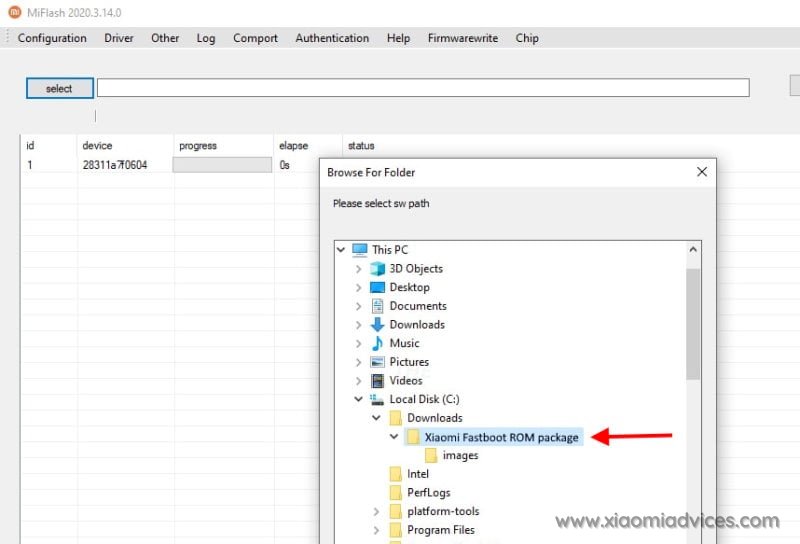
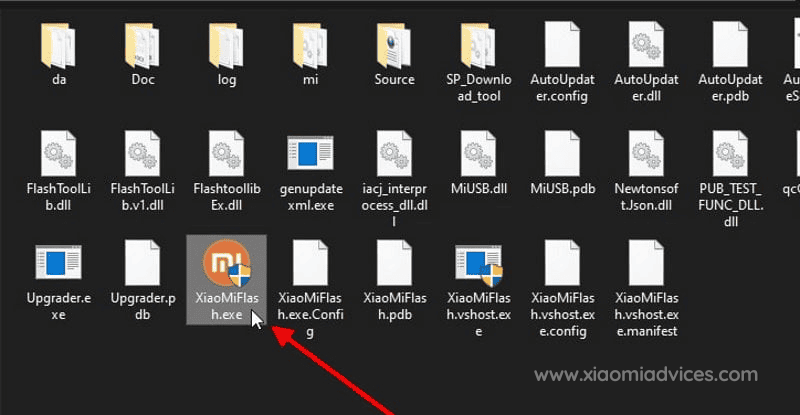
  6. Run XiaoMiFlash.exe and select the HyperOS OS3.0.301.0.WPWTRXM Fastboot ROM folder. Mi ROM Flash Tool - XiaoMiFlash.exe Redmi Pad 2 Pro/POCO Pad M1 (Turkey) HyperOS OS3.0.301.0.WPWTRXM Fastboot ROM Folder
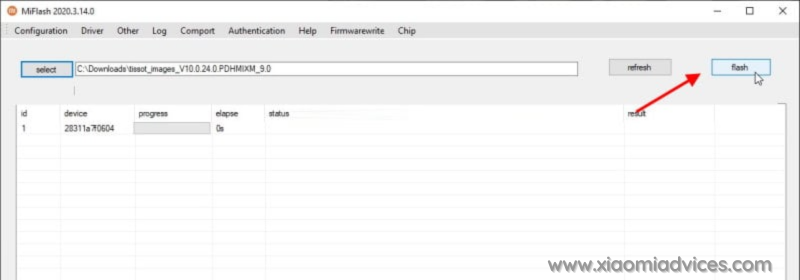
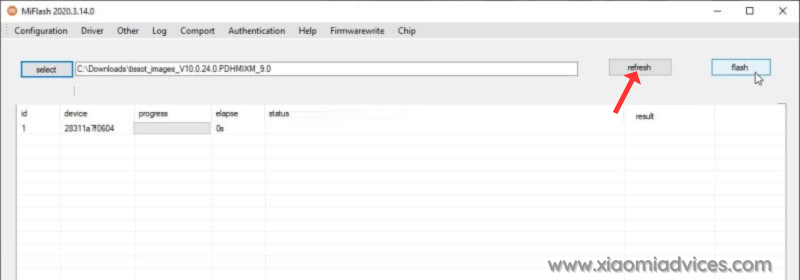
  7. Click on refresh to detect your device and click on flash to start the flashing process. Click Mi ROM Flash Tool Refresh button Start Redmi Pad 2 Pro/POCO Pad M1 HyperOS OS3.0.301.0.WPWTRXM Fastboot ROM Flashing
Follow the detailed guide on how to flash HyperOS OS3.0.301.0.WPWTRXM Fastboot ROM on Xiaomi, Redmi and POCO devices here.

How to Install HyperOS OS3.0.301.0.WPWTRXM Recovery ROM on Redmi Pad 2 Pro/POCO Pad M1 (flute) via Stock Recovery

We can update the Redmi Pad 2 Pro/POCO Pad M1 (Turkey) firmware via recovery without using computer. However, the Recovery ROM HyperOS version must be higher than your current installed version, as downgrading firmware is blocked by Xiaomi.

While user data is retained when flashing via stock recovery, it’s recommended to backup your Redmi Pad 2 Pro/POCO Pad M1 (Turkey) data before installing, in case of accidental data loss.

Follow the steps to install HyperOS OS3.0.301.0.WPWTRXM Recovery ROM on Redmi Pad 2 Pro/POCO Pad M1 using stock recovery:

  1. Download the Redmi Pad 2 Pro/POCO Pad M1 HyperOS OS3.0.301.0.WPWTRXM Recovery ROM zip for Turkey region.
  2. Rename the zip file to “update.zip” if the name differs.
  3. Transfer the update.zip to the root of your phone’s internal storage.
  4. Press and hold the Volume Up and Power buttons together to boot into recovery mode. For some devices you’ll have to press Volume Up, Volume Down and Power buttons to boot into recovery mode.
  5. The update will automatically start flashing if the correct ROM zip is detected.
  6. Once firmware installation completes, your phone will reboot into the updated HyperOS OS3.0.301.0.WPWTRXM version. User data and apps are retained after the process.

For older Xiaomi phones, you may need to manually select “Install update.zip to System One” from the Recovery menu. After install, exit Recovery and boot into HyperOS.
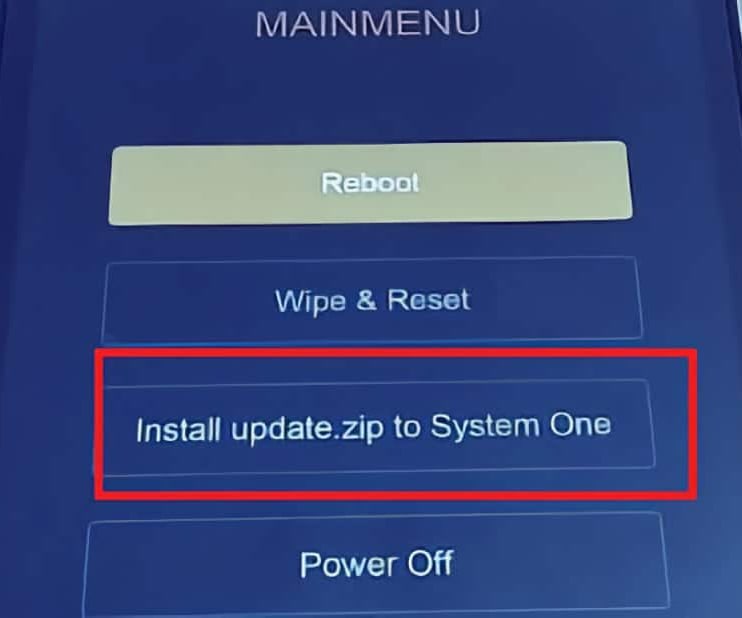
Xiaomi Recovery Menu

Install HyperOS Recovery ROM on Redmi Pad 2 Pro/POCO Pad M1 via Software Updater using PC

You can install HyperOS OS3.0.301.0.WPWTRXM firmware updates on your Redmi Pad 2 Pro/POCO Pad M1 device using a Windows PC, without needing to unlock the bootloader. This method suits for the situations like: Updating Global Stable ROM from Global Stable ROM, Updating Global Beta ROM from Global Beta ROM, Updating to Global Beta ROM from Global Stable ROM and vice versa.

Follow these steps to flash Recovery ROM on Redmi Pad 2 Pro/POCO Pad M1 (Turkey) using a PC:

  1. Download the latest Redmi Pad 2 Pro/POCO Pad M1 (Turkey) HyperOS OS3.0.301.0.WPWTRXM Recovery ROM zip.
  2. Connect your phone to the PC using a USB cable.
  3. Copy the downloaded ROM zip file to the internal storage on your device, in the “downloaded_rom” folder. If the folder doesn’t exists create it before copying the ROM file.
  4. On the phone, open Settings and go to About Phone → System Update.
  5. Tap the 3-dot menu (⋮) in the top right and select “Select update package” or “Choose update package“.
  6. Choose the Recovery ROM zip file you copied to the phone’s storage.
  7. Once you select the ROM file, the update process will start automatically and install the new HyperOS firmware version.

This method lets you update HyperOS using PC without needing to unlock bootloader or wipe data.
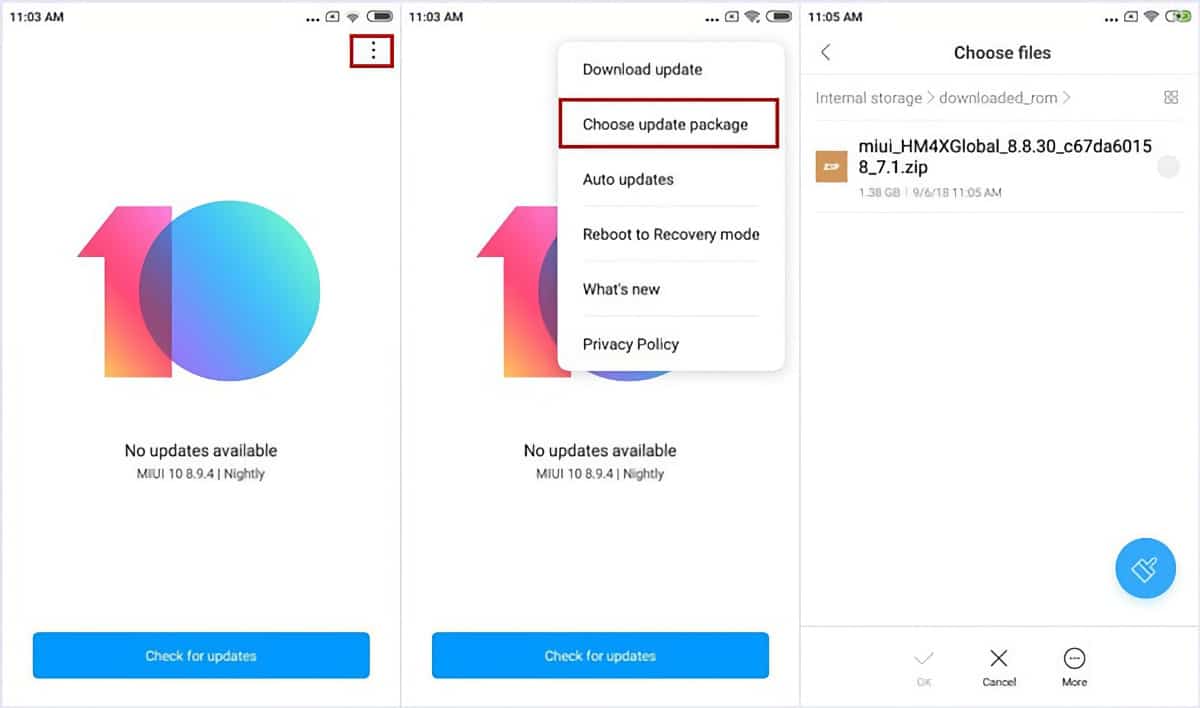
Install Redmi Pad 2 Pro/POCO Pad M1 (Turkey) HyperOS OS3.0.301.0.WPWTRXM Recovery ROM

Follow the detailed guide on how to flash HyperOS OS3.0.301.0.WPWTRXM Recovery ROM on Xiaomi, Redmi and POCO devices here.

TwitterFacebookWhatsAppRedditBufferLinkedInPin It

Primary Sidebar

Recent Posts

Download the latest Version of Xiaomi Mi Flash Pro Tool

Download the latest Version of Xiaomi Mi Flash Pro Tool

How to Identify Unknown Numbers on Xiaomi, Redmi & POCO…

How to Identify Unknown Numbers on Xiaomi, Redmi & POCO Phones

How to Disable Developer Options on Xiaomi, Redmi & POCO…

How to Disable Developer Options on Xiaomi, Redmi & POCO Phones

How to Add & Remove Google Search Bar on Android…

How to Add & Remove Google Search Bar on Android Home Screen in Xiaomi, Redmi & POCO

How to Easily Take a Screenshot on Xiaomi, Redmi &…

How to Easily Take a Screenshot on Xiaomi, Redmi & POCO Phones

Latest Devices

Xiaomi Poco M7 4G Specifications

Xiaomi Poco M7 4G

Xiaomi Poco M7 Plus Specifications

Xiaomi Poco M7 Plus

Xiaomi Redmi 15C 4G Specifications

Xiaomi Redmi 15C 4G

Xiaomi Redmi 15 Specifications

Xiaomi Redmi 15

Xiaomi Redmi 15 4G Specifications

Xiaomi Redmi 15 4G

Xiaomi Redmi K Pad Specifications

Xiaomi Redmi K Pad

Xiaomi Pad 7S Pro 12.5 Specifications

Xiaomi Pad 7S Pro 12.5

All Devices

Find us on Facebook

Xiaomi Advices on Facebook
  • About US
  • Privacy Policy
  • Contact Us / Advertising / Product & Apps Review

Copyright © 2026. Xiaomi Advices | This site is not an official Xiaomi website. Xiaomi and MIUI are properties of Xiaomi.