• Skip to primary navigation
  • Skip to main content
  • Skip to primary sidebar

XIAOMI ADVICES

Xiaomi News Blog | MIUI ROM | Firmware Update | Custom ROM | Root | Android Apps | Lineage OS

Search icon
  • HyperOS
  • MIUI ROM
  • Mobile Phone Specs
  • Xiaomi USB Drivers
  • Root
  • How To
Trending 🔥
MIUI 15 MIUI 14 Download MIUI 14 Features Xiaomi Android 13 Magisk Zygisk POCO Launcher Xiaomi Game Turbo 5.0 Mi Account Unlock
Home HyperOS Redmi Turbo 5/POCO X8 Pro OS4.0.3.0.XPJCNXM
Join Xiaomi Advices on Telegram

Download Redmi Turbo 5/POCO X8 Pro China HyperOS OS4.0.3.0.XPJCNXM Fastboot ROM and Recovery ROM

FacebookTwitterReddit

On this page, you can download HyperOS 4 (OS4.0.3.0.XPJCNXM) flash file for Redmi Turbo 5/POCO X8 Pro (China) based on Android version.

Redmi Turbo 5/POCO X8 Pro HyperOS OS4.0.3.0.XPJCNXM Recovery ROM & Fastboot ROM

The Redmi Turbo 5/POCO X8 Pro (Codenamed: klee) HyperOS OS4.0.3.0.XPJCNXM for China is available as:

  • Full Recovery ROM – Full ROM package for installs via Recovery.
  • Full Fastboot ROM – Full ROM package for clean installs.

Follow the detailed tutorial on how to install HyperOS OS4.0.3.0.XPJCNXM on Redmi Turbo 5/POCO X8 Pro (China) from here – Fastboot ROM | Recovery ROM.

Disclaimer

Flashing is a tedious process and should be carried out carefully; otherwise, it may permanently damage your device. XiaomiAdvices.com or Xiaomi is not responsible for any damage that may be caused to your device while flashing. Proceed at your own risk.

Table of contents
  1. How to Flash HyperOS OS4.0.3.0.XPJCNXM Fastboot ROM on Redmi Turbo 5/POCO X8 Pro (China)
  2. How to Install HyperOS OS4.0.3.0.XPJCNXM Recovery ROM on Redmi Turbo 5/POCO X8 Pro (klee) via Stock Recovery
  3. Install HyperOS Recovery ROM on Redmi Turbo 5/POCO X8 Pro via Software Updater using PC

Redmi Turbo 5/POCO X8 Pro HyperOS OS4.0.3.0.XPJCNXM China Stable Recovery ROM

RECOVERY ROM
File Nameklee-ota_full-OS4.0.3.0.XPJCNXM-user-17.0-3578778f20.zip
DeviceRedmi Turbo 5/POCO X8 Pro
Codenameklee
HyperOS VersionOS4.0.3.0.XPJCNXM
Androidn/a
BranchStable
RegionChina
TypeFull
Size8.5 GB
Date2026-10-26
MD53578778f2025b9aeb5ef2f2bf454a0f3
Changelog

Redmi Turbo 5/POCO X8 Pro OS4.0.3.0.XPJCNXM Stable Recovery ROM – Changelog

[Basic experience]
Reduced system load and memory use for lasting smooth performance
New: Precision workload scheduling helps optimize system-wide performance
Optimization: System workload scheduling handles tasks more efficiently, while redundant instructions have been removed to improve performance and reduce power consumption
Optimization: CPU processing and GPU rendering workloads consume less power
Optimization: Graphics rendering reduces UI power consumption and stuttering
Optimization: Game frequency scaling delivers more stable frame rates in demanding scenarios such as team battles

New: Memory preloading helps apps respond faster
Optimization: Memory reservation and allocation reduce resource use and memory usage after startup
Optimization: Background resource scheduling loads resources only when needed and staggers background tasks to reduce memory use and improve performance
Optimization: Memory preloading and storage prefetching reduce occasional stuttering and frame drops, speed up cold starts, and improve app responsiveness

New: Xiaomi HyperOS app runtime environment helps system apps run more smoothly and use resources more efficiently
Optimization: Home screen and Gallery interactions provide smoother visuals and more responsive controls
Optimization: Gallery and Weather use fewer CPU and memory resources in the background
[Xiaomi Hyper XiaoAi]
Upgraded Xiaomi Hyper XiaoAi now understands you better and makes everyday tasks easier
New interactions:
New: Xiaomi Hyper XiaoAi supports Xiaomi HyperIsland, letting you follow the progress of long-running AI tasks in real time. Notifications automatically expand when tasks are complete.
New: Xiaomi Hyper XiaoAi action bubble. Swipe in from the side and pause to bring it up, then point to on-screen content to ask questions or take action. Drag it to a location to start navigation, or to an event to add it to your calendar.
Optimization: The default Xiaomi Hyper XiaoAi voice sounds more natural
Optimization: The Xiaomi Hyper XiaoAi start page makes it easier to view previous tasks, open your profile, or start a new conversation using the tabs at the bottom
Pro mode:
New: Xiaomi Hyper XiaoAi offers Pro mode for complex and scheduled tasks across apps and devices, with cloud-based tools for document processing and webpage creation
Memories and memory preferences can now sync across phones, tablets, and computers
Transfer files across devices, send files from your computer to your phone, and search for files on other phones, tablets, and computers
Control devices with a single request, such as casting your screen
Create webpages, PowerPoint presentations, Word documents, Excel spreadsheets, and PDFs with a single request, with support for cloud-based file processing such as document format conversion
Phone notifications sync to your tablet and computer in real time, and you can reply from either device using Home screen+
Privacy protection:
New: Xiaomi Hyper XiaoAi includes additional privacy safeguards. AI can control apps and access data only within the permissions you grant, and asks for confirmation before sensitive actions to help prevent unintended operations.
New: Xiaomi Hyper XiaoAi includes a memory management page where you can control what your assistant is allowed to remember. Memories are encrypted and stored locally for greater privacy and control.
[Alive Design Philosophy]
Refreshed system visuals for a more polished look
New: A soft glass material responds to surrounding colors and automatically adjusts its transparency for a more refined look
New: Soft glass lighting effects respond dynamically to your actions for more fluid interactions
New: The Lock screen offers more clock customization options, including text width and height, position, font, and material style
New: Notifications can appear in stacks on the Lock screen and at the bottom of the Notification shade for easier access and smoother animations
New: The Home screen supports widget stacks. Swipe up or down to switch between widgets, with multiple shapes and styles available for a clearer view of information.
New: You can resize Home screen folders by dragging their edges
New: System apps use an adaptive floating layout with a refreshed design that adjusts to different screen sizes for more immersive browsing and clearer navigation
New: Third party apps support seamless transition animations
Optimization: Opening and closing animations for landscape apps and screen rotation animations in multi-window scenarios provide smoother transitions
[Comprehensive system app optimization]
Upgraded core system apps to make them more useful and easier to use
Phone:
New: Added the new AI calls feature for easier call handling
You can now ask Xiaomi Hyper XiaoAi to set when AI should answer incoming calls for you. After each call, AI will automatically summarize the key points.
AI reply suggestions for common calls, such as food delivery and courier calls. Once you confirm a suggestion, AI will reply to the caller by voice.

Notes:
New: Notes supports real-time transcription and automatic summaries for recordings
New: AI Summary offers templates for meetings, interviews, classes, and general use, creating structured summaries that make key points easier to find
New: You can import audio and images from your device and automatically turn their content into AI notes
New: Xiaomi Hyper XiaoAi is available in Notes, letting you ask questions about your content, edit notes, and more
Xiaomi Hyper XiaoAi Keyboard:
New: Voice input uses AI to turn speech into clear, well-structured text
New: AI can generate chat replies based on conversation context, with multiple styles available
New: AI Translate supports typed and voice input for real-time translation between Chinese and English
New: Autofill supports card and ID information
Recorder:
New: Recordings include a timeline outline to help you quickly find and jump to specific parts
New: AI can generate concise summaries of marked key points
New: AI Summary offers templates for meetings and general use, automatically turning recordings into structured summaries
New: Recording playback can automatically skip silent segments for a more streamlined listening experience
Other:
New: File Manager includes “Recently deleted”, making it easy to restore deleted files
New: Clipboard shortcuts work in more scenarios. After copying text, you can quickly extract ID information, make calls, start navigation, and more.
New: Mi Mover can now transfer Xiaomi Hyper XiaoAi conversation history and scheduled tasks
New: Xiaomi Cloud backup can now back up photos, messages, contacts, call history, documents, Xiaomi Hyper XiaoAi data, including conversation history and scheduled tasks, WeChat data, including chat history, QQ data, including chat history, and more
New: Optimize recognition in low light. When you add your face data in low light, screen brightness will temporarily increase to improve recognition.
New: You can now submit issues or suggestions simply by chatting with Xiaomi Hyper XiaoAi
Optimization: Calendar shows more relevant event details based on the event type
[Interconnectivity]
New: Xiaomi Smart Hub offers card-based controls, letting you pin frequently used devices, switch between homes with one tap, and control devices across the Human Ă— Car Ă— Home ecosystem more easily
New: Xiaomi Interconnectivity for PC and Mac has been upgraded. Use Xiaomi Hyper XiaoAi to transfer files and sync notifications across your computer, phone, and tablet.
New: Two Xiaomi phones can connect to each other, allowing calls and SMS verification codes to sync between them. You can handle calls and messages on either phone and quickly copy recognized content with one tap.
Go to Settings > Interconnectivity > Cross-device notifications > Receive, select another Xiaomi phone signed in to the same Xiaomi Account, turn on call and message notifications, and make sure both phones are connected to the internet
[Privacy and security]
New: Secure access to photos and videos supports albums and smart search, making it easier to find the content you want
New: You can reset your screen lock if you forget it. Within 96 hours of adding a fingerprint, use your previous screen lock and fingerprint to set a new one.
[Other]
Visit our website to learn more: https://hyperos.mi.com/

Redmi Turbo 5/POCO X8 Pro HyperOS OS4.0.3.0.XPJCNXM China Stable Fastboot ROM

FASTBOOT ROM
File Nameklee_images_OS4.0.3.0.XPJCNXM_20261020.0000.00_17.0_cn_a3f508245f.tgz
DeviceRedmi Turbo 5/POCO X8 Pro
Codenameklee
HyperOS VersionOS4.0.3.0.XPJCNXM
Android17.0
BranchStable
RegionChina
TypeFull
Size11.2 GB
Date2026-10-20
MD5a3f508245f7feabde56d2c1664a89c4b
Changelog

Redmi Turbo 5/POCO X8 Pro OS4.0.3.0.XPJCNXM Stable Fastboot ROM – Changelog

[Basic experience]
Reduced system load and memory use for lasting smooth performance
New: Precision workload scheduling helps optimize system-wide performance
Optimization: System workload scheduling handles tasks more efficiently, while redundant instructions have been removed to improve performance and reduce power consumption
Optimization: CPU processing and GPU rendering workloads consume less power
Optimization: Graphics rendering reduces UI power consumption and stuttering
Optimization: Game frequency scaling delivers more stable frame rates in demanding scenarios such as team battles

New: Memory preloading helps apps respond faster
Optimization: Memory reservation and allocation reduce resource use and memory usage after startup
Optimization: Background resource scheduling loads resources only when needed and staggers background tasks to reduce memory use and improve performance
Optimization: Memory preloading and storage prefetching reduce occasional stuttering and frame drops, speed up cold starts, and improve app responsiveness

New: Xiaomi HyperOS app runtime environment helps system apps run more smoothly and use resources more efficiently
Optimization: Home screen and Gallery interactions provide smoother visuals and more responsive controls
Optimization: Gallery and Weather use fewer CPU and memory resources in the background
[Xiaomi Hyper XiaoAi]
Upgraded Xiaomi Hyper XiaoAi now understands you better and makes everyday tasks easier
New interactions:
New: Xiaomi Hyper XiaoAi supports Xiaomi HyperIsland, letting you follow the progress of long-running AI tasks in real time. Notifications automatically expand when tasks are complete.
New: Xiaomi Hyper XiaoAi action bubble. Swipe in from the side and pause to bring it up, then point to on-screen content to ask questions or take action. Drag it to a location to start navigation, or to an event to add it to your calendar.
Optimization: The default Xiaomi Hyper XiaoAi voice sounds more natural
Optimization: The Xiaomi Hyper XiaoAi start page makes it easier to view previous tasks, open your profile, or start a new conversation using the tabs at the bottom
Pro mode:
New: Xiaomi Hyper XiaoAi offers Pro mode for complex and scheduled tasks across apps and devices, with cloud-based tools for document processing and webpage creation
Memories and memory preferences can now sync across phones, tablets, and computers
Transfer files across devices, send files from your computer to your phone, and search for files on other phones, tablets, and computers
Control devices with a single request, such as casting your screen
Create webpages, PowerPoint presentations, Word documents, Excel spreadsheets, and PDFs with a single request, with support for cloud-based file processing such as document format conversion
Phone notifications sync to your tablet and computer in real time, and you can reply from either device using Home screen+
Privacy protection:
New: Xiaomi Hyper XiaoAi includes additional privacy safeguards. AI can control apps and access data only within the permissions you grant, and asks for confirmation before sensitive actions to help prevent unintended operations.
New: Xiaomi Hyper XiaoAi includes a memory management page where you can control what your assistant is allowed to remember. Memories are encrypted and stored locally for greater privacy and control.
[Alive Design Philosophy]
Refreshed system visuals for a more polished look
New: A soft glass material responds to surrounding colors and automatically adjusts its transparency for a more refined look
New: Soft glass lighting effects respond dynamically to your actions for more fluid interactions
New: The Lock screen offers more clock customization options, including text width and height, position, font, and material style
New: Notifications can appear in stacks on the Lock screen and at the bottom of the Notification shade for easier access and smoother animations
New: The Home screen supports widget stacks. Swipe up or down to switch between widgets, with multiple shapes and styles available for a clearer view of information.
New: You can resize Home screen folders by dragging their edges
New: System apps use an adaptive floating layout with a refreshed design that adjusts to different screen sizes for more immersive browsing and clearer navigation
New: Third party apps support seamless transition animations
Optimization: Opening and closing animations for landscape apps and screen rotation animations in multi-window scenarios provide smoother transitions
[Comprehensive system app optimization]
Upgraded core system apps to make them more useful and easier to use
Phone:
New: Added the new AI calls feature for easier call handling
You can now ask Xiaomi Hyper XiaoAi to set when AI should answer incoming calls for you. After each call, AI will automatically summarize the key points.
AI reply suggestions for common calls, such as food delivery and courier calls. Once you confirm a suggestion, AI will reply to the caller by voice.

Notes:
New: Notes supports real-time transcription and automatic summaries for recordings
New: AI Summary offers templates for meetings, interviews, classes, and general use, creating structured summaries that make key points easier to find
New: You can import audio and images from your device and automatically turn their content into AI notes
New: Xiaomi Hyper XiaoAi is available in Notes, letting you ask questions about your content, edit notes, and more
Xiaomi Hyper XiaoAi Keyboard:
New: Voice input uses AI to turn speech into clear, well-structured text
New: AI can generate chat replies based on conversation context, with multiple styles available
New: AI Translate supports typed and voice input for real-time translation between Chinese and English
New: Autofill supports card and ID information
Recorder:
New: Recordings include a timeline outline to help you quickly find and jump to specific parts
New: AI can generate concise summaries of marked key points
New: AI Summary offers templates for meetings and general use, automatically turning recordings into structured summaries
New: Recording playback can automatically skip silent segments for a more streamlined listening experience
Other:
New: File Manager includes “Recently deleted”, making it easy to restore deleted files
New: Clipboard shortcuts work in more scenarios. After copying text, you can quickly extract ID information, make calls, start navigation, and more.
New: Mi Mover can now transfer Xiaomi Hyper XiaoAi conversation history and scheduled tasks
New: Xiaomi Cloud backup can now back up photos, messages, contacts, call history, documents, Xiaomi Hyper XiaoAi data, including conversation history and scheduled tasks, WeChat data, including chat history, QQ data, including chat history, and more
New: Optimize recognition in low light. When you add your face data in low light, screen brightness will temporarily increase to improve recognition.
New: You can now submit issues or suggestions simply by chatting with Xiaomi Hyper XiaoAi
Optimization: Calendar shows more relevant event details based on the event type
[Interconnectivity]
New: Xiaomi Smart Hub offers card-based controls, letting you pin frequently used devices, switch between homes with one tap, and control devices across the Human Ă— Car Ă— Home ecosystem more easily
New: Xiaomi Interconnectivity for PC and Mac has been upgraded. Use Xiaomi Hyper XiaoAi to transfer files and sync notifications across your computer, phone, and tablet.
New: Two Xiaomi phones can connect to each other, allowing calls and SMS verification codes to sync between them. You can handle calls and messages on either phone and quickly copy recognized content with one tap.
Go to Settings > Interconnectivity > Cross-device notifications > Receive, select another Xiaomi phone signed in to the same Xiaomi Account, turn on call and message notifications, and make sure both phones are connected to the internet
[Privacy and security]
New: Secure access to photos and videos supports albums and smart search, making it easier to find the content you want
New: You can reset your screen lock if you forget it. Within 96 hours of adding a fingerprint, use your previous screen lock and fingerprint to set a new one.
[Other]
Visit our website to learn more: https://hyperos.mi.com/

How to Flash HyperOS OS4.0.3.0.XPJCNXM Fastboot ROM on Redmi Turbo 5/POCO X8 Pro (China)

  1. Download and extract the Redmi Turbo 5/POCO X8 Pro HyperOS OS4.0.3.0.XPJCNXM Fastboot ROM on your computer. Make sure to check if the ROM file suffix is “.tgz“. If it is “.gz“, please rename it to “.tgz“.
  2. Download and extract Xiaomi Flash Tool on your computer.
  3. Make sure your Redmi Turbo 5/POCO X8 Pro’s bootloader is unlocked.
  4. Power off and boot Redmi Turbo 5/POCO X8 Pro (China) into Fastboot Mode by pressing the Volume Down and Power buttons together until you see the Fastboot logo. Redmi Turbo 5/POCO X8 Pro (China) Fastboot Mode

  5. Connect your device to computer using USB Cable.
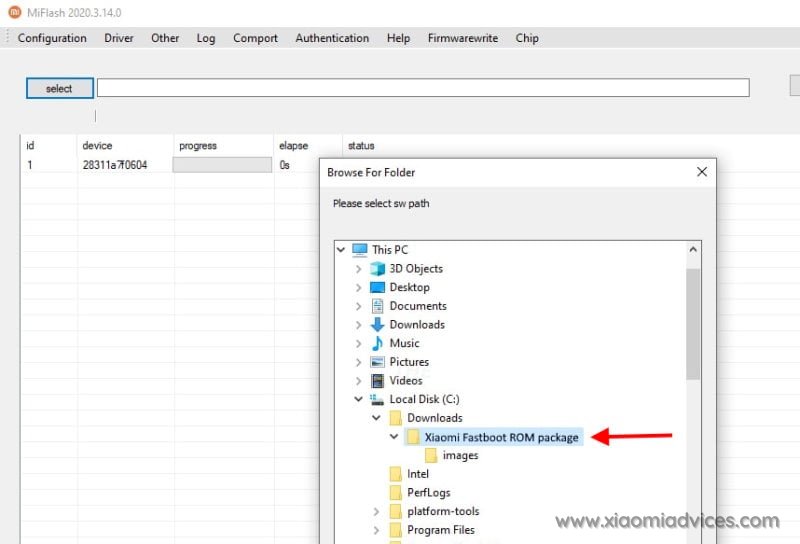
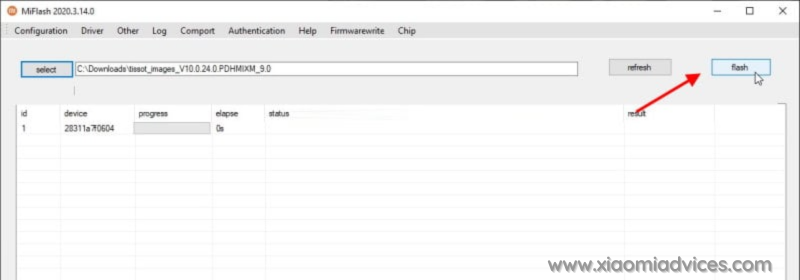
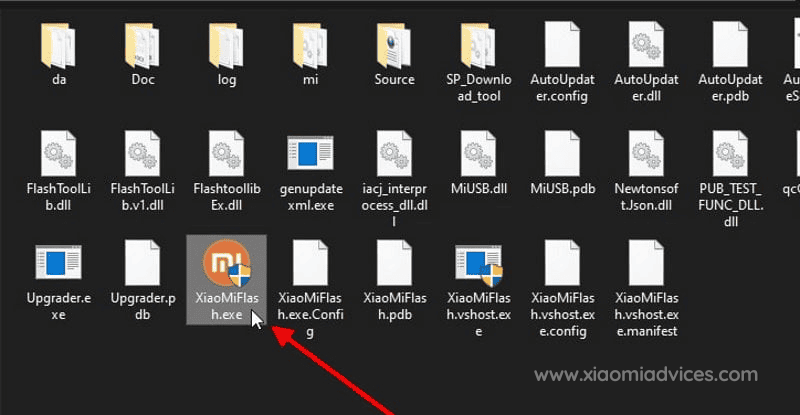
  6. Run XiaoMiFlash.exe and select the HyperOS OS4.0.3.0.XPJCNXM Fastboot ROM folder. Xiaomi Flash Tool - XiaoMiFlash.exe Redmi Turbo 5/POCO X8 Pro (China) HyperOS OS4.0.3.0.XPJCNXM Fastboot ROM Folder
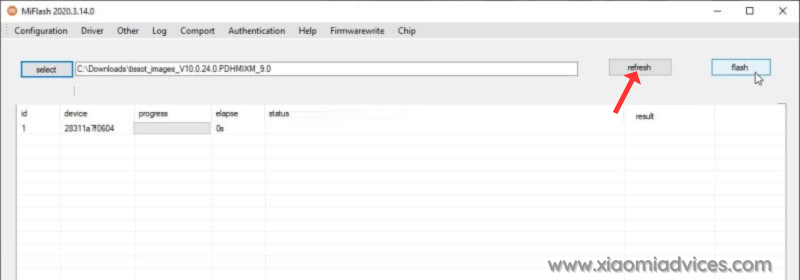
  7. Click on refresh to detect your device and click on flash to start the flashing process. Click Xiaomi Flash Tool Refresh button Start Redmi Turbo 5/POCO X8 Pro HyperOS OS4.0.3.0.XPJCNXM Fastboot ROM Flashing
Follow the detailed guide on how to flash HyperOS OS4.0.3.0.XPJCNXM Fastboot ROM on Xiaomi, Redmi and POCO devices here.

How to Install HyperOS OS4.0.3.0.XPJCNXM Recovery ROM on Redmi Turbo 5/POCO X8 Pro (klee) via Stock Recovery

We can update the Redmi Turbo 5/POCO X8 Pro (China) firmware via recovery without using computer. However, the Recovery ROM HyperOS version must be higher than your current installed version, as downgrading firmware is blocked by Xiaomi.

While user data is retained when flashing via stock recovery, it’s recommended to backup your Redmi Turbo 5/POCO X8 Pro (China) data before installing, in case of accidental data loss.

Follow the steps to install HyperOS OS4.0.3.0.XPJCNXM Recovery ROM on Redmi Turbo 5/POCO X8 Pro using stock recovery:

  1. Download the Redmi Turbo 5/POCO X8 Pro HyperOS OS4.0.3.0.XPJCNXM Recovery ROM zip for China region.
  2. Rename the zip file to “update.zip” if the name differs.
  3. Transfer the update.zip to the root of your phone’s internal storage.
  4. Press and hold the Volume Up and Power buttons together to boot into recovery mode. For some devices you’ll have to press Volume Up, Volume Down and Power buttons to boot into recovery mode.
  5. The update will automatically start flashing if the correct ROM zip is detected.
  6. Once firmware installation completes, your phone will reboot into the updated HyperOS OS4.0.3.0.XPJCNXM version. User data and apps are retained after the process.

For older Xiaomi phones, you may need to manually select “Install update.zip to System One” from the Recovery menu. After install, exit Recovery and boot into HyperOS.
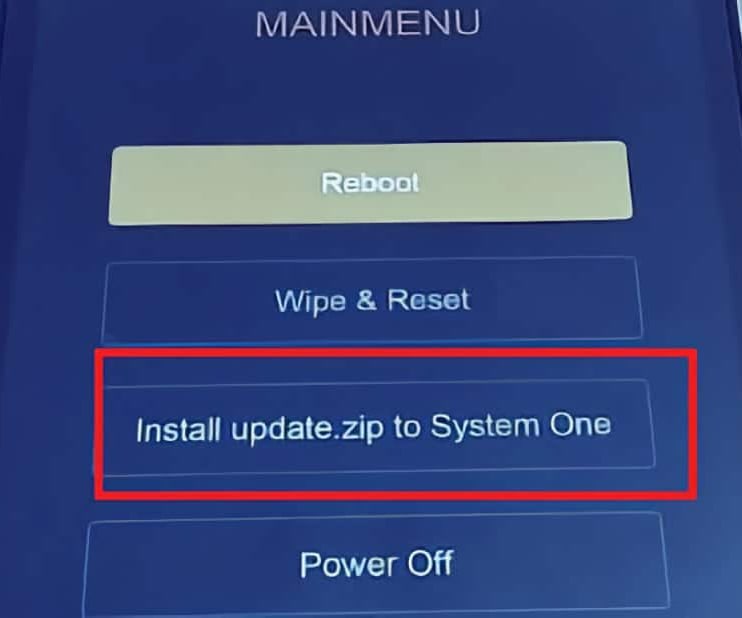
Xiaomi Recovery Menu

Install HyperOS Recovery ROM on Redmi Turbo 5/POCO X8 Pro via Software Updater using PC

You can install HyperOS OS4.0.3.0.XPJCNXM firmware updates on your Redmi Turbo 5/POCO X8 Pro device using a Windows PC, without needing to unlock the bootloader. This method suits for the situations like: Updating Global Stable ROM from Global Stable ROM, Updating Global Beta ROM from Global Beta ROM, Updating to Global Beta ROM from Global Stable ROM and vice versa.

Follow these steps to flash Recovery ROM on Redmi Turbo 5/POCO X8 Pro (China) using a PC:

  1. Download the latest Redmi Turbo 5/POCO X8 Pro (China) HyperOS OS4.0.3.0.XPJCNXM Recovery ROM zip.
  2. Connect your phone to the PC using a USB cable.
  3. Copy the downloaded ROM zip file to the internal storage on your device, in the “downloaded_rom” folder. If the folder doesn’t exists create it before copying the ROM file.
  4. On the phone, open Settings and go to About Phone → System Update.
  5. Tap the 3-dot menu (⋮) in the top right and select “Select update package” or “Choose update package“.
  6. Choose the Recovery ROM zip file you copied to the phone’s storage.
  7. Once you select the ROM file, the update process will start automatically and install the new HyperOS firmware version.

This method lets you update HyperOS using PC without needing to unlock bootloader or wipe data.
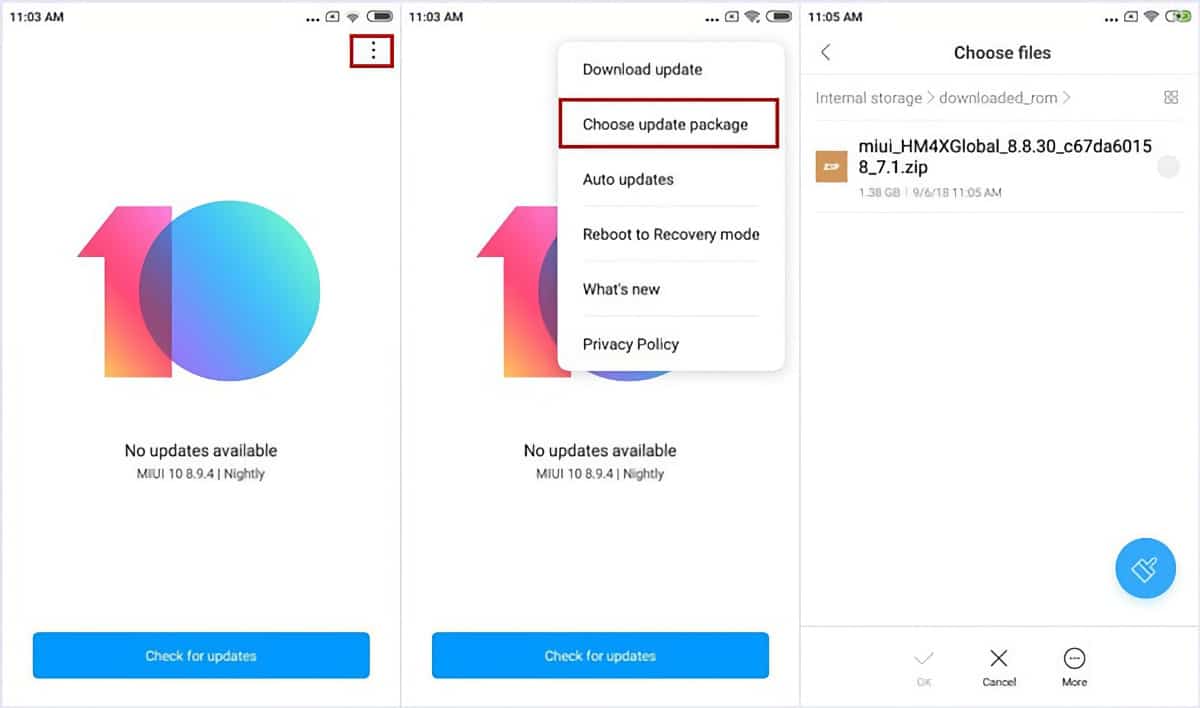
Install Redmi Turbo 5/POCO X8 Pro (China) HyperOS OS4.0.3.0.XPJCNXM Recovery ROM

Follow the detailed guide on how to flash HyperOS OS4.0.3.0.XPJCNXM Recovery ROM on Xiaomi, Redmi and POCO devices here.

TwitterFacebookWhatsAppRedditBufferLinkedInPin It

Primary Sidebar

Recent Posts

Download the latest Version of Xiaomi Mi Flash Pro Tool

Download the latest Version of Xiaomi Mi Flash Pro Tool

How to Identify Unknown Numbers on Xiaomi, Redmi & POCO…

How to Identify Unknown Numbers on Xiaomi, Redmi & POCO Phones

How to Disable Developer Options on Xiaomi, Redmi & POCO…

How to Disable Developer Options on Xiaomi, Redmi & POCO Phones

How to Add & Remove Google Search Bar on Android…

How to Add & Remove Google Search Bar on Android Home Screen in Xiaomi, Redmi & POCO

How to Easily Take a Screenshot on Xiaomi, Redmi &…

How to Easily Take a Screenshot on Xiaomi, Redmi & POCO Phones

Latest Devices

Xiaomi Poco M7 4G Specifications

Xiaomi Poco M7 4G

Xiaomi Poco M7 Plus Specifications

Xiaomi Poco M7 Plus

Xiaomi Redmi 15C 4G Specifications

Xiaomi Redmi 15C 4G

Xiaomi Redmi 15 Specifications

Xiaomi Redmi 15

Xiaomi Redmi 15 4G Specifications

Xiaomi Redmi 15 4G

Xiaomi Redmi K Pad Specifications

Xiaomi Redmi K Pad

Xiaomi Pad 7S Pro 12.5 Specifications

Xiaomi Pad 7S Pro 12.5

All Devices

Find us on Facebook

Xiaomi Advices on Facebook
  • About US
  • Privacy Policy
  • Contact Us / Advertising / Product & Apps Review

Copyright © 2026. Xiaomi Advices | This site is not an official Xiaomi website. Xiaomi and MIUI are properties of Xiaomi.