• Skip to primary navigation
  • Skip to main content
  • Skip to primary sidebar

XIAOMI ADVICES

Xiaomi News Blog | MIUI ROM | Firmware Update | Custom ROM | Root | Android Apps | Lineage OS

Search icon
  • HyperOS
  • MIUI ROM
  • Mobile Phone Specs
  • Xiaomi USB Drivers
  • Root
  • How To
Trending šŸ”„
MIUI 15 MIUI 14 Download MIUI 14 Features Xiaomi Android 13 Magisk Zygisk POCO Launcher Xiaomi Game Turbo 5.0 Mi Account Unlock
Home HyperOS Redmi Note 17 5G/POCO M8 Power 5G OS3.0.301.0.WPUMIXM
Join Xiaomi Advices on Telegram

Download Redmi Note 17 5G/POCO M8 Power 5G Global HyperOS OS3.0.301.0.WPUMIXM Fastboot ROM

FacebookTwitterReddit

On this page, you can download HyperOS 3 (OS3.0.301.0.WPUMIXM) flash file for Redmi Note 17 5G/POCO M8 Power 5G (Global) based on Android 16 version.

Redmi Note 17 5G/POCO M8 Power 5G HyperOS OS3.0.301.0.WPUMIXM Recovery ROM & Fastboot ROM

The Redmi Note 17 5G/POCO M8 Power 5G (Codenamed: mist) HyperOS OS3.0.301.0.WPUMIXM for Global is available as:

  • Full Fastboot ROM – Full ROM package for clean installs.

Follow the detailed tutorial on how to install HyperOS OS3.0.301.0.WPUMIXM on Redmi Note 17 5G/POCO M8 Power 5G (Global) from here – Fastboot ROM.

Disclaimer

Flashing is a tedious process and should be carried out carefully; otherwise, it may permanently damage your device. XiaomiAdvices.com or Xiaomi is not responsible for any damage that may be caused to your device while flashing. Proceed at your own risk.

Redmi Note 17 5G/POCO M8 Power 5G HyperOS OS3.0.301.0.WPUMIXM Global Stable Fastboot ROM

FASTBOOT ROM
File Namemist_global_images_OS3.0.301.0.WPUMIXM_20260713.0000.00_16.0_global_4b45f6fd17.tgz
DeviceRedmi Note 17 5G/POCO M8 Power 5G
Codenamemist
HyperOS VersionOS3.0.301.0.WPUMIXM
Android16.0
BranchStable
RegionGlobal
TypeFull
Size8.2 GB
Date2026-07-13
MD54b45f6fd17f04dc02e26f67767618cd3
Changelog

Redmi Note 17 5G/POCO M8 Power 5G OS3.0.301.0.WPUMIXM Stable Fastboot ROM – Changelog

Bug fixes and system optimizations.

How to Flash HyperOS OS3.0.301.0.WPUMIXM Fastboot ROM on Redmi Note 17 5G/POCO M8 Power 5G (Global)

  1. Download and extract the Redmi Note 17 5G/POCO M8 Power 5G HyperOS OS3.0.301.0.WPUMIXM Fastboot ROM on your computer. Make sure to check if the ROM file suffix is ā€œ.tgzā€œ. If it is ā€œ.gzā€œ, please rename it to ā€œ.tgzā€œ.
  2. Download and extract MiFlash Tool on your computer.
  3. Make sure your Redmi Note 17 5G/POCO M8 Power 5G’s bootloader is unlocked.
  4. Power off and boot Redmi Note 17 5G/POCO M8 Power 5G (Global) into Fastboot Mode by pressing the Volume Down and Power buttons together until you see the Fastboot logo. Redmi Note 17 5G/POCO M8 Power 5G (Global) Fastboot Mode

  5. Connect your device to computer using USB Cable.
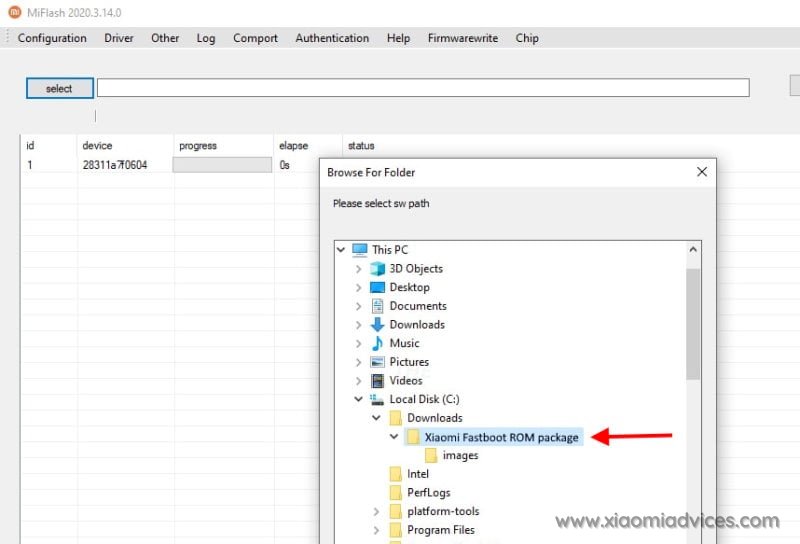
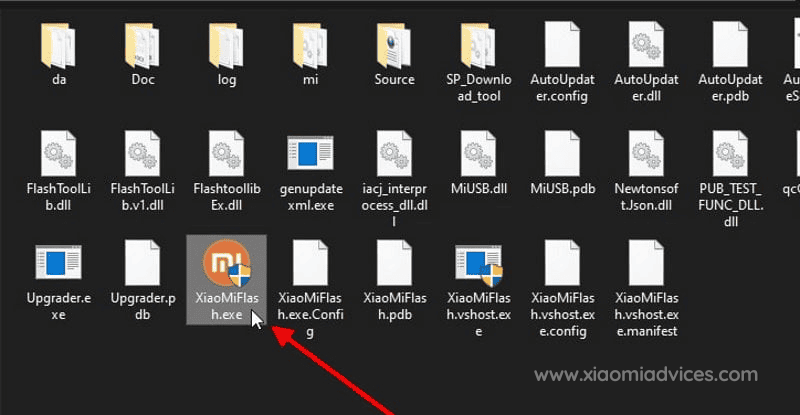
  6. Run XiaoMiFlash.exe and select the HyperOS OS3.0.301.0.WPUMIXM Fastboot ROM folder. MiFlash Tool - XiaoMiFlash.exe Redmi Note 17 5G/POCO M8 Power 5G (Global) HyperOS OS3.0.301.0.WPUMIXM Fastboot ROM Folder
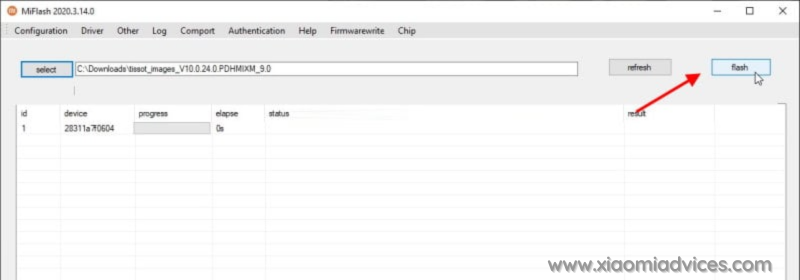
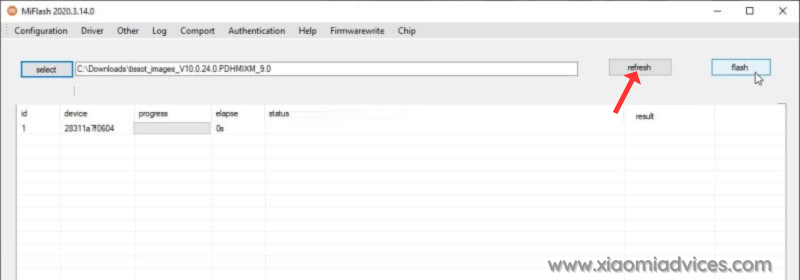
  7. Click on refresh to detect your device and click on flash to start the flashing process. Click MiFlash Tool Refresh button Start Redmi Note 17 5G/POCO M8 Power 5G HyperOS OS3.0.301.0.WPUMIXM Fastboot ROM Flashing
Follow the detailed guide on how to flash HyperOS OS3.0.301.0.WPUMIXM Fastboot ROM on Xiaomi, Redmi and POCO devices here.

TwitterFacebookWhatsAppRedditBufferLinkedInPin It

Primary Sidebar

Recent Posts

Download the latest Version of Xiaomi Mi Flash Pro Tool

Download the latest Version of Xiaomi Mi Flash Pro Tool

How to Identify Unknown Numbers on Xiaomi, Redmi & POCO…

How to Identify Unknown Numbers on Xiaomi, Redmi & POCO Phones

How to Disable Developer Options on Xiaomi, Redmi & POCO…

How to Disable Developer Options on Xiaomi, Redmi & POCO Phones

How to Add & Remove Google Search Bar on Android…

How to Add & Remove Google Search Bar on Android Home Screen in Xiaomi, Redmi & POCO

How to Easily Take a Screenshot on Xiaomi, Redmi &…

How to Easily Take a Screenshot on Xiaomi, Redmi & POCO Phones

Latest Devices

Xiaomi Poco M7 4G Specifications

Xiaomi Poco M7 4G

Xiaomi Poco M7 Plus Specifications

Xiaomi Poco M7 Plus

Xiaomi Redmi 15C 4G Specifications

Xiaomi Redmi 15C 4G

Xiaomi Redmi 15 Specifications

Xiaomi Redmi 15

Xiaomi Redmi 15 4G Specifications

Xiaomi Redmi 15 4G

Xiaomi Redmi K Pad Specifications

Xiaomi Redmi K Pad

Xiaomi Pad 7S Pro 12.5 Specifications

Xiaomi Pad 7S Pro 12.5

All Devices

Find us on Facebook

Xiaomi Advices on Facebook
  • About US
  • Privacy Policy
  • Contact Us / Advertising / Product & Apps Review

Copyright Ā© 2026. Xiaomi Advices | This site is not an official Xiaomi website. Xiaomi and MIUI are properties of Xiaomi.