
• Skip to primary navigation
  • Skip to main content
  • Skip to primary sidebar

XIAOMI ADVICES

Xiaomi News Blog | MIUI ROM | Firmware Update | Custom ROM | Root | Android Apps | Lineage OS

Search icon
  • HyperOS
  • MIUI ROM
  • Mobile Phone Specs
  • Xiaomi USB Drivers
  • Root
  • How To
Trending 🔥
MIUI 15 MIUI 14 Download MIUI 14 Features Xiaomi Android 13 Magisk Zygisk POCO Launcher Xiaomi Game Turbo 5.0 Mi Account Unlock
Home HyperOS Xiaomi Pad 7 Pro OS3.0.301.0.WOYCNXM
Join Xiaomi Advices on Telegram

Download Xiaomi Pad 7 Pro China HyperOS OS3.0.301.0.WOYCNXM Recovery ROM

FacebookTwitterReddit

On this page, you can download HyperOS 3 (OS3.0.301.0.WOYCNXM) flash file for Xiaomi Pad 7 Pro (China) based on Android version.

Xiaomi Pad 7 Pro HyperOS OS3.0.301.0.WOYCNXM Recovery ROM & Fastboot ROM

The Xiaomi Pad 7 Pro (Codenamed: muyu) HyperOS OS3.0.301.0.WOYCNXM for China is available as:

  • Full Recovery ROM – Full ROM package for installs via Recovery.
  • Incremental Update (Recovery ROM) – Incremental MIUI OS3.0.301.0.WOYCNXM OTA update.

Follow the detailed tutorial on how to install HyperOS OS3.0.301.0.WOYCNXM on Xiaomi Pad 7 Pro (China) from here – Recovery ROM | Incremental Update.

Disclaimer

Flashing is a tedious process and should be carried out carefully; otherwise, it may permanently damage your device. XiaomiAdvices.com or Xiaomi is not responsible for any damage that may be caused to your device while flashing. Proceed at your own risk.

Xiaomi Pad 7 Pro HyperOS OS3.0.301.0.WOYCNXM China Stable Beta Recovery ROM

RECOVERY ROM
File Namemuyu-ota_full-OS3.0.301.0.WOYCNXM-user-16.0-79e887d218.zip
DeviceXiaomi Pad 7 Pro
Codenamemuyu
HyperOS VersionOS3.0.301.0.WOYCNXM
Androidn/a
BranchStable Beta
RegionChina
TypeFull
Size8.8 GB
Date2026-03-26
MD579e887d21872a2615789eb8f13bfc6c5
Changelog

Xiaomi Pad 7 Pro OS3.0.301.0.WOYCNXM Stable Beta Recovery ROM – Changelog

[Xiaomi HyperIsland]
New: View all the important info at a glance with Xiaomi HyperIsland
New: Now you can pull down to expand small windows and handle multiple tasks more efficiently
[Comprehensive system app optimization]
Xiaomi Hyper XiaoAi:
New: Support for continuous conversations with Xiaomi Hyper XiaoAi while holding the Power button

Calendar:
Optimization: Holiday display in Calendar, with more traditional festivals and historical commemorative days
Fix: An issue where dates displayed incorrectly in some cases

Family Guard:
New: The option to view and edit Family Guard settings before you turn on Child mode
Optimization: Saving feature settings when turning off On-device guardianship
Optimization: Screen time stats in Child mode

Other improvements:
New: The option to tap the status bar to return to the top of the page in some apps and scenarios
Optimization: Visual feedback when you adjust screen brightness with the keyboard
Optimization: Mi Mover now supports transferring more data, including some settings and user data from system apps
Optimization: Home screen grid has been redesigned with more balanced margins and more comfortable spacing
Optimization: Gallery search animations for smoother transitions
Fix: Cloud drive file thumbnails in File Manager displayed incorrectly in some cases
Fix: An issue where macOS compressed files didn’t display properly in File Manager in some cases
Fix: An issue where WeChat couldn’t access screenshots in some cases
Fix: Stuttering when loading multilingual screenshot thumbnails in some cases
Optimization: The timeliness and accuracy of weather location updates when your location changes
[Interconnectivity]
New: Xiaomi tablets now support AirPods, including fast pair pop-ups, battery status, Spatial Audio, noise cancellation switching, and Find My
Optimization: Response speed for cross-device controls when using Xiaomi tablets with laptops
New: On Mac, Xiaomi Interconnectivity now lets you view Xiaomi Cloud Notes and Gallery
[Privacy and security]
New: With the Passwords app, you can auto-save, autofill, and sync end-to-end encrypted passwords across devices
New: More system apps now support Private access, with ongoing compatibility improvements for additional apps
Optimization: Updated “Fingerprints, face data, and screen lock” page layout for easier, faster setup

Xiaomi Pad 7 Pro HyperOS OS3.0.301.0.WOYCNXM China Stable Beta Incremental Update Recovery ROM

INCREMENTAL UPDATE
File Namemuyu-ota_incremental-OS3.0.11.0.WOYCNXM-OS3.0.301.0.WOYCNXM-user-16.0-b82c0dfcaa.zip
DeviceXiaomi Pad 7 Pro
Codenamemuyu
HyperOS VersionOS3.0.301.0.WOYCNXM
Androidn/a
BranchStable Beta
RegionChina
TypeIncremental
Size8.8 GB
Date2026-03-26
Changelog

Xiaomi Pad 7 Pro OS3.0.301.0.WOYCNXM Stable Beta Incremental Update – Changelog

[Xiaomi HyperIsland]
New: View all the important info at a glance with Xiaomi HyperIsland
New: Now you can pull down to expand small windows and handle multiple tasks more efficiently
[Comprehensive system app optimization]
Xiaomi Hyper XiaoAi:
New: Support for continuous conversations with Xiaomi Hyper XiaoAi while holding the Power button

Calendar:
Optimization: Holiday display in Calendar, with more traditional festivals and historical commemorative days
Fix: An issue where dates displayed incorrectly in some cases

Family Guard:
New: The option to view and edit Family Guard settings before you turn on Child mode
Optimization: Saving feature settings when turning off On-device guardianship
Optimization: Screen time stats in Child mode

Other improvements:
New: The option to tap the status bar to return to the top of the page in some apps and scenarios
Optimization: Visual feedback when you adjust screen brightness with the keyboard
Optimization: Mi Mover now supports transferring more data, including some settings and user data from system apps
Optimization: Home screen grid has been redesigned with more balanced margins and more comfortable spacing
Optimization: Gallery search animations for smoother transitions
Fix: Cloud drive file thumbnails in File Manager displayed incorrectly in some cases
Fix: An issue where macOS compressed files didn’t display properly in File Manager in some cases
Fix: An issue where WeChat couldn’t access screenshots in some cases
Fix: Stuttering when loading multilingual screenshot thumbnails in some cases
Optimization: The timeliness and accuracy of weather location updates when your location changes
[Interconnectivity]
New: Xiaomi tablets now support AirPods, including fast pair pop-ups, battery status, Spatial Audio, noise cancellation switching, and Find My
Optimization: Response speed for cross-device controls when using Xiaomi tablets with laptops
New: On Mac, Xiaomi Interconnectivity now lets you view Xiaomi Cloud Notes and Gallery
[Privacy and security]
New: With the Passwords app, you can auto-save, autofill, and sync end-to-end encrypted passwords across devices
New: More system apps now support Private access, with ongoing compatibility improvements for additional apps
Optimization: Updated “Fingerprints, face data, and screen lock” page layout for easier, faster setup

How to Install HyperOS OS3.0.301.0.WOYCNXM Recovery ROM on Xiaomi Pad 7 Pro (muyu) via Stock Recovery

We can update the Xiaomi Pad 7 Pro (China) firmware via recovery without using computer. However, the Recovery ROM HyperOS version must be higher than your current installed version, as downgrading firmware is blocked by Xiaomi.

While user data is retained when flashing via stock recovery, it’s recommended to backup your Xiaomi Pad 7 Pro (China) data before installing, in case of accidental data loss.

Follow the steps to install HyperOS OS3.0.301.0.WOYCNXM Recovery ROM on Xiaomi Pad 7 Pro using stock recovery:

  1. Download the Xiaomi Pad 7 Pro HyperOS OS3.0.301.0.WOYCNXM Recovery ROM zip for China region.
  2. Rename the zip file to “update.zip” if the name differs.
  3. Transfer the update.zip to the root of your phone’s internal storage.
  4. Press and hold the Volume Up and Power buttons together to boot into recovery mode. For some devices you’ll have to press Volume Up, Volume Down and Power buttons to boot into recovery mode.
  5. The update will automatically start flashing if the correct ROM zip is detected.
  6. Once firmware installation completes, your phone will reboot into the updated HyperOS OS3.0.301.0.WOYCNXM version. User data and apps are retained after the process.

For older Xiaomi phones, you may need to manually select “Install update.zip to System One” from the Recovery menu. After install, exit Recovery and boot into HyperOS.
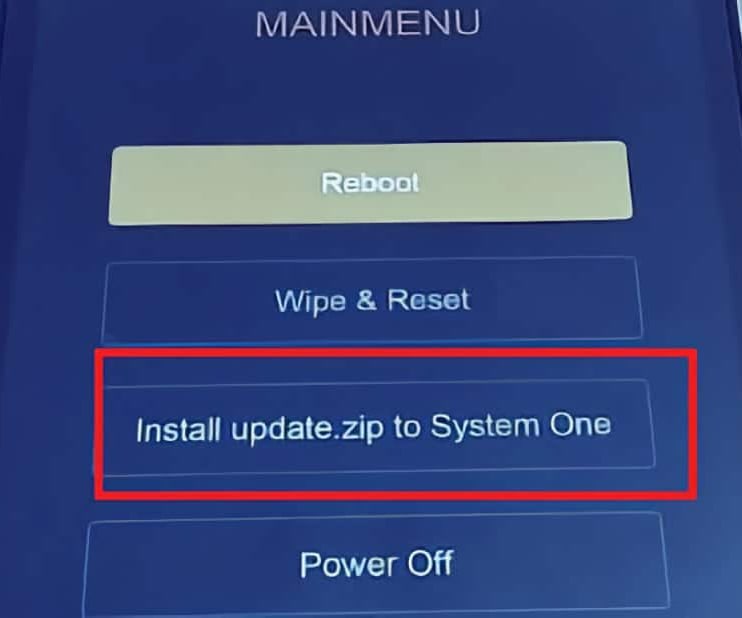
Xiaomi Recovery Menu

Install HyperOS Recovery ROM on Xiaomi Pad 7 Pro via Software Updater using PC

You can install HyperOS OS3.0.301.0.WOYCNXM firmware updates on your Xiaomi Pad 7 Pro device using a Windows PC, without needing to unlock the bootloader. This method suits for the situations like: Updating Global Stable ROM from Global Stable ROM, Updating Global Beta ROM from Global Beta ROM, Updating to Global Beta ROM from Global Stable ROM and vice versa.

Follow these steps to flash Recovery ROM on Xiaomi Pad 7 Pro (China) using a PC:

  1. Download the latest Xiaomi Pad 7 Pro (China) HyperOS OS3.0.301.0.WOYCNXM Recovery ROM zip.
  2. Connect your phone to the PC using a USB cable.
  3. Copy the downloaded ROM zip file to the internal storage on your device, in the “downloaded_rom” folder. If the folder doesn’t exists create it before copying the ROM file.
  4. On the phone, open Settings and go to About Phone → System Update.
  5. Tap the 3-dot menu (⋮) in the top right and select “Select update package” or “Choose update package“.
  6. Choose the Recovery ROM zip file you copied to the phone’s storage.
  7. Once you select the ROM file, the update process will start automatically and install the new HyperOS firmware version.

This method lets you update HyperOS using PC without needing to unlock bootloader or wipe data.
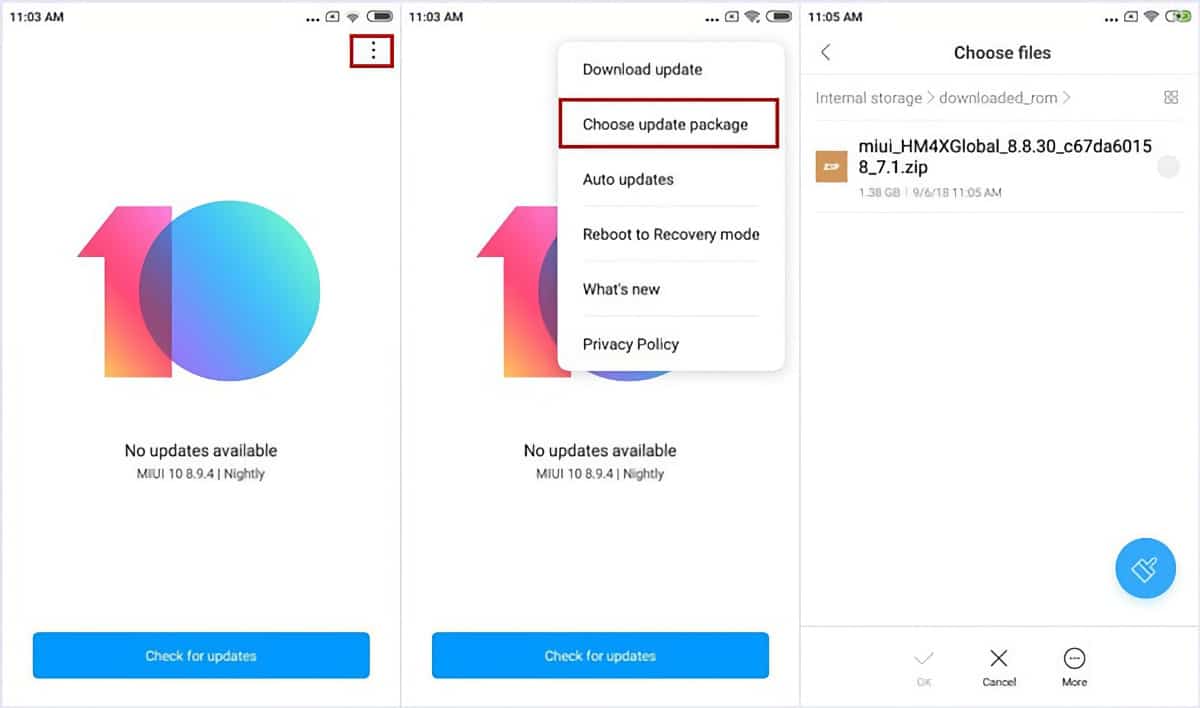
Install Xiaomi Pad 7 Pro (China) HyperOS OS3.0.301.0.WOYCNXM Recovery ROM

Follow the detailed guide on how to flash HyperOS OS3.0.301.0.WOYCNXM Recovery ROM on Xiaomi, Redmi and POCO devices here.

TwitterFacebookWhatsAppRedditBufferLinkedInPin It

Primary Sidebar

Recent Posts

Download the latest Version of Xiaomi Mi Flash Pro Tool

Download the latest Version of Xiaomi Mi Flash Pro Tool

How to Identify Unknown Numbers on Xiaomi, Redmi & POCO…

How to Identify Unknown Numbers on Xiaomi, Redmi & POCO Phones

How to Disable Developer Options on Xiaomi, Redmi & POCO…

How to Disable Developer Options on Xiaomi, Redmi & POCO Phones

How to Add & Remove Google Search Bar on Android…

How to Add & Remove Google Search Bar on Android Home Screen in Xiaomi, Redmi & POCO

How to Easily Take a Screenshot on Xiaomi, Redmi &…

How to Easily Take a Screenshot on Xiaomi, Redmi & POCO Phones

Latest Devices

Xiaomi Poco M7 4G Specifications

Xiaomi Poco M7 4G

Xiaomi Poco M7 Plus Specifications

Xiaomi Poco M7 Plus

Xiaomi Redmi 15C 4G Specifications

Xiaomi Redmi 15C 4G

Xiaomi Redmi 15 Specifications

Xiaomi Redmi 15

Xiaomi Redmi 15 4G Specifications

Xiaomi Redmi 15 4G

Xiaomi Redmi K Pad Specifications

Xiaomi Redmi K Pad

Xiaomi Pad 7S Pro 12.5 Specifications

Xiaomi Pad 7S Pro 12.5

All Devices

Find us on Facebook

Xiaomi Advices on Facebook
  • About US
  • Privacy Policy
  • Contact Us / Advertising / Product & Apps Review

Copyright © 2026. Xiaomi Advices | This site is not an official Xiaomi website. Xiaomi and MIUI are properties of Xiaomi.