
On this page, you can download HyperOS 3 (OS3.0.307.0.WAVMIXM) flash file for Redmi M100/Redmi 17 5G/POCO M8x 5G (Global) based on Android version.

The Redmi M100/Redmi 17 5G/POCO M8x 5G (Codenamed: steppe) HyperOS OS3.0.307.0.WAVMIXM for Global is available as:
- Full Recovery ROM – Full ROM package for installs via Recovery.
- Full Fastboot ROM – Full ROM package for clean installs.
Follow the detailed tutorial on how to install HyperOS OS3.0.307.0.WAVMIXM on Redmi M100/Redmi 17 5G/POCO M8x 5G (Global) from here – Fastboot ROM | Recovery ROM.
Disclaimer
Flashing is a tedious process and should be carried out carefully; otherwise, it may permanently damage your device. XiaomiAdvices.com or Xiaomi is not responsible for any damage that may be caused to your device while flashing. Proceed at your own risk.
Redmi M100/Redmi 17 5G/POCO M8x 5G HyperOS OS3.0.307.0.WAVMIXM Global Stable Recovery ROM
| RECOVERY ROM | |
|---|---|
| File Name | steppe_global-ota_full-OS3.0.307.0.WAVMIXM-user-16.0-0cddb60965.zip |
| Device | Redmi M100/Redmi 17 5G/POCO M8x 5G |
| Codename | steppe |
| HyperOS Version | OS3.0.307.0.WAVMIXM |
| Android | n/a |
| Branch | Stable |
| Region | Global |
| Type | Full |
| Size | 4.9 GB |
| Date | 2026-08-10 |
| MD5 | 0cddb609656f2387d197b972252a3534 |
Redmi M100/Redmi 17 5G/POCO M8x 5G HyperOS OS3.0.307.0.WAVMIXM Global Stable Fastboot ROM
| FASTBOOT ROM | |
|---|---|
| File Name | steppe_global_images_OS3.0.307.0.WAVMIXM_20260801.0000.00_16.0_global_d83230f39a.tgz |
| Device | Redmi M100/Redmi 17 5G/POCO M8x 5G |
| Codename | steppe |
| HyperOS Version | OS3.0.307.0.WAVMIXM |
| Android | 16.0 |
| Branch | Stable |
| Region | Global |
| Type | Full |
| Size | 8.0 GB |
| Date | 2026-08-01 |
| MD5 | d83230f39a0318737fa1ecdd9b8b0049 |
How to Flash HyperOS OS3.0.307.0.WAVMIXM Fastboot ROM on Redmi M100/Redmi 17 5G/POCO M8x 5G (Global)
- Download and extract the Redmi M100/Redmi 17 5G/POCO M8x 5G HyperOS OS3.0.307.0.WAVMIXM Fastboot ROM on your computer. Make sure to check if the ROM file suffix is “.tgz“. If it is “.gz“, please rename it to “.tgz“.
- Download and extract Mi ROM Flashing Tool on your computer.
- Make sure your Redmi M100/Redmi 17 5G/POCO M8x 5G’s bootloader is unlocked.
- Power off and boot Redmi M100/Redmi 17 5G/POCO M8x 5G (Global) into Fastboot Mode by pressing the Volume Down and Power buttons together until you see the Fastboot logo.

- Connect your device to computer using USB Cable.
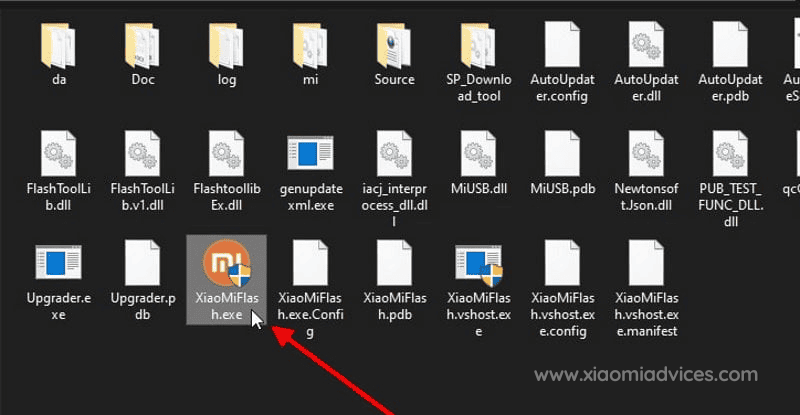
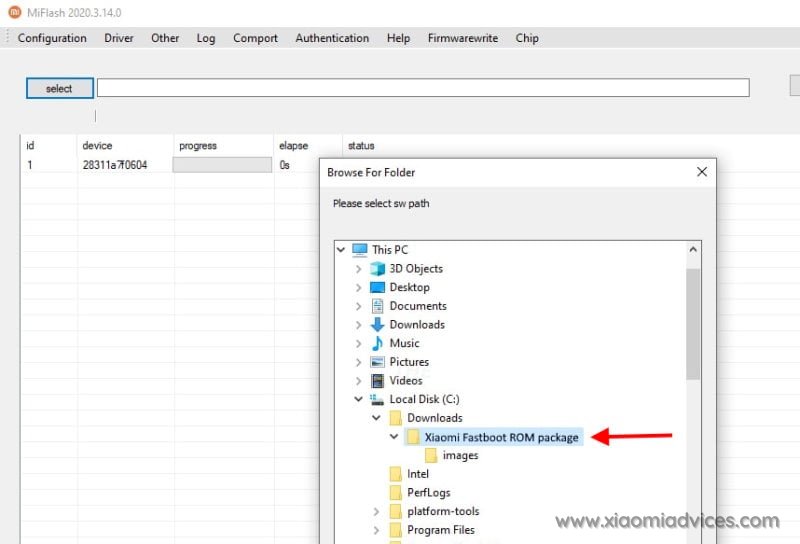
- Run XiaoMiFlash.exe and select the HyperOS OS3.0.307.0.WAVMIXM Fastboot ROM folder.
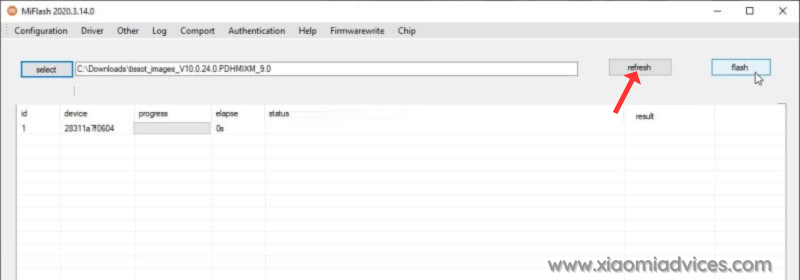
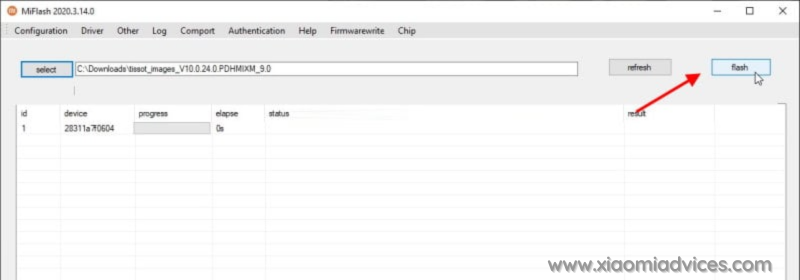
- Click on refresh to detect your device and click on flash to start the flashing process.
Follow the detailed guide on how to flash HyperOS OS3.0.307.0.WAVMIXM Fastboot ROM on Xiaomi, Redmi and POCO devices here.
How to Install HyperOS OS3.0.307.0.WAVMIXM Recovery ROM on Redmi M100/Redmi 17 5G/POCO M8x 5G (steppe) via Stock Recovery
We can update the Redmi M100/Redmi 17 5G/POCO M8x 5G (Global) firmware via recovery without using computer. However, the Recovery ROM HyperOS version must be higher than your current installed version, as downgrading firmware is blocked by Xiaomi.
While user data is retained when flashing via stock recovery, it’s recommended to backup your Redmi M100/Redmi 17 5G/POCO M8x 5G (Global) data before installing, in case of accidental data loss.
Follow the steps to install HyperOS OS3.0.307.0.WAVMIXM Recovery ROM on Redmi M100/Redmi 17 5G/POCO M8x 5G using stock recovery:
- Download the Redmi M100/Redmi 17 5G/POCO M8x 5G HyperOS OS3.0.307.0.WAVMIXM Recovery ROM zip for Global region.
- Rename the zip file to “update.zip” if the name differs.
- Transfer the update.zip to the root of your phone’s internal storage.
- Press and hold the Volume Up and Power buttons together to boot into recovery mode. For some devices you’ll have to press Volume Up, Volume Down and Power buttons to boot into recovery mode.
- The update will automatically start flashing if the correct ROM zip is detected.
- Once firmware installation completes, your phone will reboot into the updated HyperOS OS3.0.307.0.WAVMIXM version. User data and apps are retained after the process.
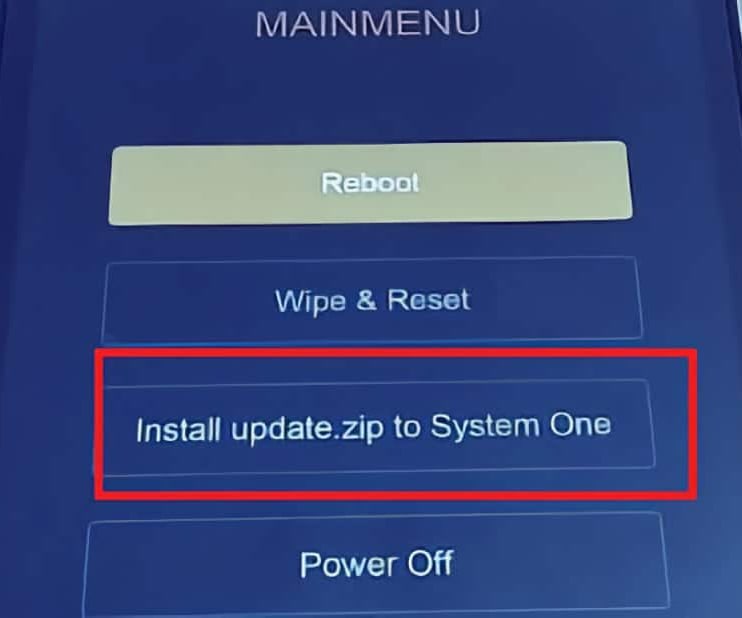
For older Xiaomi phones, you may need to manually select “Install update.zip to System One” from the Recovery menu. After install, exit Recovery and boot into HyperOS.
Install HyperOS Recovery ROM on Redmi M100/Redmi 17 5G/POCO M8x 5G via Software Updater using PC
You can install HyperOS OS3.0.307.0.WAVMIXM firmware updates on your Redmi M100/Redmi 17 5G/POCO M8x 5G device using a Windows PC, without needing to unlock the bootloader. This method suits for the situations like: Updating Global Stable ROM from Global Stable ROM, Updating Global Beta ROM from Global Beta ROM, Updating to Global Beta ROM from Global Stable ROM and vice versa.
Follow these steps to flash Recovery ROM on Redmi M100/Redmi 17 5G/POCO M8x 5G (Global) using a PC:
- Download the latest Redmi M100/Redmi 17 5G/POCO M8x 5G (Global) HyperOS OS3.0.307.0.WAVMIXM Recovery ROM zip.
- Connect your phone to the PC using a USB cable.
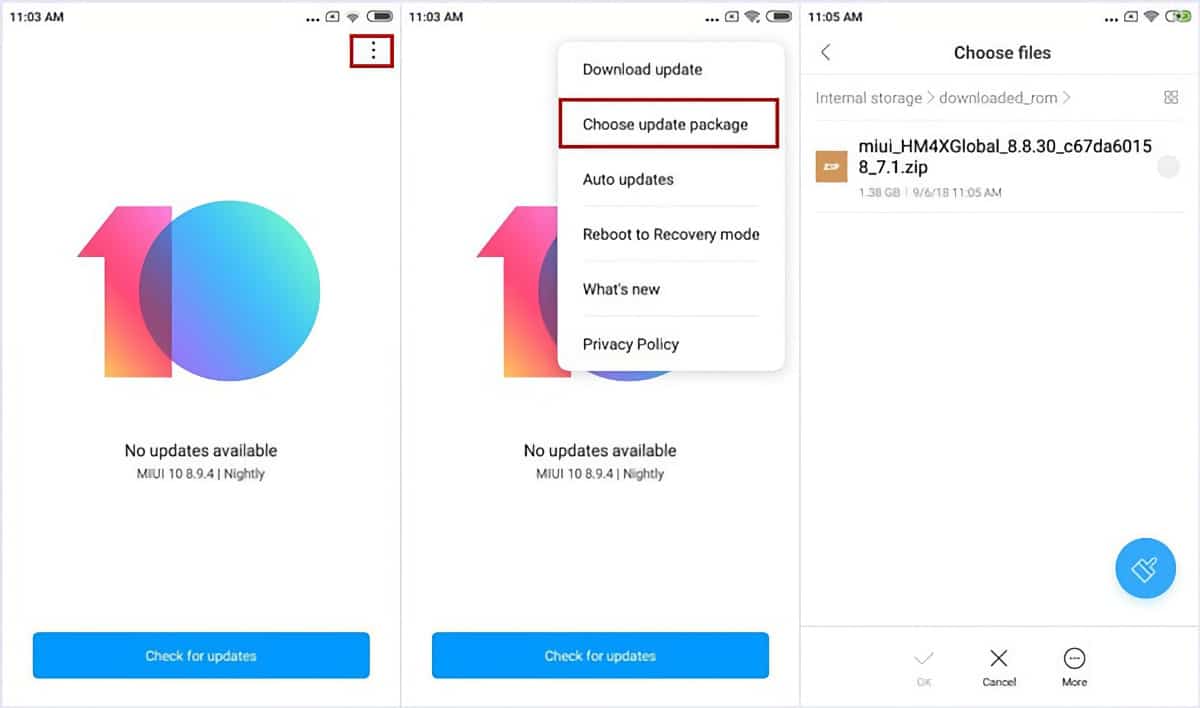
- Copy the downloaded ROM zip file to the internal storage on your device, in the “downloaded_rom” folder. If the folder doesn’t exists create it before copying the ROM file.
- On the phone, open Settings and go to About Phone → System Update.
- Tap the 3-dot menu (⋮) in the top right and select “Select update package” or “Choose update package“.
- Choose the Recovery ROM zip file you copied to the phone’s storage.
- Once you select the ROM file, the update process will start automatically and install the new HyperOS firmware version.
This method lets you update HyperOS using PC without needing to unlock bootloader or wipe data.
Follow the detailed guide on how to flash HyperOS OS3.0.307.0.WAVMIXM Recovery ROM on Xiaomi, Redmi and POCO devices here.